 AuctionSniper
The cheapest lot in the STALZONE auction list is not the item's price yet. It is one seller's offer: a hundred dearer lots may stand behind it, and the item often changes hands at quite another price. Below: how to read the list of lots, how lots differ from deals, what moves a price, how to turn all of this into a price to buy at with the fee counted in, and four cases from the program's live data. The article is put together from several sources and checked against what the program sees. Where a conclusion is still a hypothesis and not a rule of the game, it says so. RU and EU servers have their own prices, the approach is the same. The figures in the examples come from AuctionSniper's demo window; in the live cases the prices are scaled and the proportions are real. Nobody promises a profit: a price depends on the item, the season and the time of day.
The first lot in the list is not the price yet
The auction sorts lots by price, and the eye catches the top row. It has three catches.
- The lot may be the only one. Someone is in a hurry to sell and lists well below everyone else. That lot goes first, and the next one stands at the usual price.
- The price in the list is for the whole lot. A lot of 10 pieces costs more than a single one, so a good stack often sits far down, sometimes several pages away. Compare the price per piece.
- One name covers different items. An artifact with the “| +15” upgrade and without it, an item with a green name and a plain one, different rarities: each has its own market and its own price. Compare like with like only.
The order book: lowest, wall and median
Traders call the list of lots on sale, lined up by price, the order book. On the STALZONE auction it is one-sided: you can buy a lot out or bid on it, but you can't leave an order “I'll buy at this price”. So the book shows what sellers ask, not what buyers are ready to pay.
Three numbers describe a book well:
- Lowest: the cheapest lot.
- Wall: the price where many lots stand at once. A buyer sees the lots under the wall first; above it a sale is harder, because everything cheaper goes first.
- Median: the price that half of the lots are below. An average doesn't fit a book: on a market of 279 lots around 30,000, one lot at 29,999,999 lifts the average more than four times and barely moves the median.
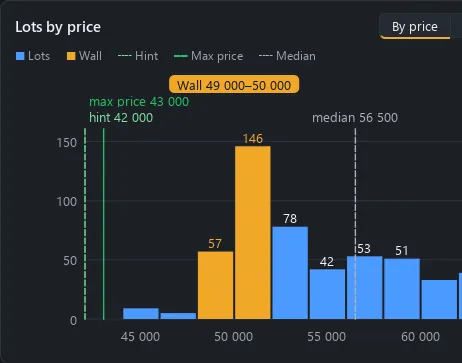
An example from the program's demo window, “Advanced Spare Parts”, 726 lots:
| What | Price per piece |
|---|---|
| Lowest | 45,000 |
| Wall, 120 lots | 49,000–50,000 |
| Median | 56,500 |
| Lots under the wall | 14 |
It reads like this: only 14 lots stand below 49,000, and they go first. A quick sale happens at about the wall, not at the median: to reach a lot at the median, a buyer has to scroll past several hundred cheaper ones.
AuctionSniper finds the wall like this: it is the lowest price that has 20 lots within 3% above it. On a market of fewer than 80 lots a quarter of all lots is enough, but no fewer than five. With no such price there is no wall: the lots are few, and the median is the guide.
Lots and deals: two different prices
A lot shows what the seller asks. A deal shows what the buyer paid. These are different numbers: a lot can hang for days at a price nobody will pay, and a cheap lot is gone before you see it. So read lot prices as sellers' wishes and look for the real price in the history of deals.
The history gives two numbers.
- The price the item went for. Look at a run of recent deals, not at the last one, and take the lower values as the guide, not the records.
- How many deals happen in a day. Twenty sales a day, for example, is less than one an hour, and you are not the only seller. The more rarely an item is bought, the longer your money stays in goods, however good the purchase was.
Auction trackers collect the deals for every item (where to look at price history). A practical order:
- From the deals history, learn what the item really sells for and how many pieces go in a day.
- From the order book, learn who you compete with right now: how many lots are cheaper and where the wall is.
- Count the price to buy at from the lower of the two numbers.
Price per piece and stacks
The list is sorted by the lot's price, so a single lot and a stack of 100 pieces stand in different parts of it. Compare the price per piece: for small lots and for stacks of one item it is usually different.
The reason is the buyers. One needs three pieces right now and will overpay rather than take a hundred. Another needs a full stack and will overpay rather than collect it piece by piece. Repacking lives on this difference.
- What happens. Small things that are bought a few at a time more often cost more in small lots. Resources that are spent by the hundred more often cost more as a full stack.
- How to use it. Compare the price per piece of small lots and of stacks of your item and buy where it is cheaper: a stack to sell in parts, or parts to make a stack.
- Where it leads. The difference holds while few people repack. The more of them, the smaller it gets, and the fee is paid all the same.
This is a pattern, not a rule of the game: your item may behave the other way round, so check before you buy. What stacks and what sells one by one is told in the article on the auction.
What moves a price and what to do about it
The price of the same item drifts during the day (more). A swing of a few percent doesn't mean the item is getting cheaper. To tell one from the other, compare the same time of day over several days, not two neighbouring hours.
Events in the game move a price more. For each one below: what happens, how to use it and where it leads. These are hypotheses, not rules of the game: test them on your own item.
- An emission and artifacts. After an emission, the map-wide storm, new artifacts appear in the Zone. Players find them and bring them to the auction: there are more sellers and as many buyers, and the price sags for a while. Artifacts are cheaper to buy soon after an emission and better sold once the inflow fades. Whoever lists their finds at once sells on the cheapest market.
- An event. While an event runs, what it drops pours onto the market, and those items get cheaper. The price of advanced spare parts, for example, falls during events. What counts as cheap is worth setting anew for the time of the event, by a fresh scan and not by last week. When the event ends the inflow stops, and the price may come back, though it doesn't have to.
- Seasonal items. An item that can only be obtained this season gets cheaper while the season runs and may get dearer once its source is closed. Buying near the end of a season is a bet that the demand will stay: the money sits in goods for months, and the bet doesn't always win.
- A game update. An update can change the item itself, a recipe or the way it is obtained, and the price moves at once, in either direction. Before an update it is better not to hold a large stock of goods it may touch. After it the old price history is no longer a guide: scan again and recount the max price.
From a price to the max price
The max price to buy at is easy to count from the price you will sell at. The auction keeps 5% on a sale (about the fee). An example with the same wall: we sell at 49,000 and buy at 42,000.
| Step | Sum | Total |
|---|---|---|
| Sold at the wall | 49,000 | |
| The auction's fee, 5% | 49,000 × 0.05 | −2,450 |
| You receive | 49,000 − 2,450 | 46,550 |
| Bought at the max price | −42,000 | |
| Left per piece | 46,550 − 42,000 | 4,550 |
The max price is counted backwards: max price = what you receive − what you want to keep. You want to keep 4,550 per piece: 46,550 − 4,550 = 42,000. Don't buy dearer than that, however cheap a lot looks next to its neighbours.
If a margin is easier to set as a percentage of the purchase price, divide what you receive by 1.10: that is the purchase price plus 10% on top. 46,550 / 1.10 = 42,318, rounded down to 42,000. This is how the program's max price hint counts.
In the program the same sum is shown by the “Your own max price” block of the item card: type a max price, and it counts what you receive and what is left per piece.
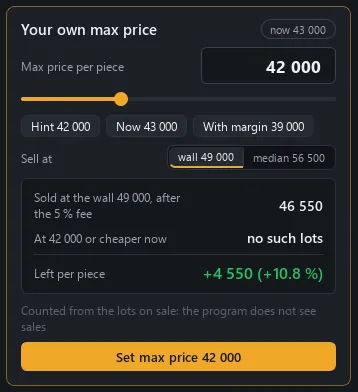
If the deals history shows the item going for less than the wall, count from the price of the deals. A deal for any number of pieces can be estimated in the trading calculator.
Four cases from live data
The rules are above; here is how they look in practice. I took my own program's data for November 2026 (RU server) and picked four cases that show how the wall and the max price work. I don't name the items. The prices are scaled: the wall is brought to 10,000 and the other prices keep the proportions they really had. In the cards green marks what the bot bought, red what another buyer got first, amber the wall.
Case 1. A good margin below the wall
The wall is 10,000 and the max price 7,500: a quarter below the wall. A lot at 5,560 appeared in the list, and the bot bought it at once; a second one like it went to another buyer 2 seconds later. Then the bot took a lot at 6,480 and four lots exactly at the max price. A sale at the wall brings 9,500: 3,940 is left from the lot at 5,560 and 2,000 from a lot at the max price. That day I was selling just below the wall, at 9,170, and even so a lot bought at the max price left 1,210.
Item A, Tuesday, November 17, 16:48. Wall 10,000, max price 7,500: a quarter below the wall.
- 5,560bought
5,560bought by someone else, 2 seconds later- 6,480bought
- 7,500× 4bought, exactly at the max price
7,500× 1bought by someone else- max price 7,500
- 7,920
- 8,330× 11
- 9,170
- 9,580× 2
- 9,810× 3
- 10,000× 22the wall: lots crowd here
Lot at 5,560
- Sale at the wall
- 10,000
- Fee 5%
- −500
- You receive
- 9,500
- Left per piece
- +3,940
Lot at the max price 7,500
- Left per piece
- +2,000
That day I was selling just below the wall, at 9,170: a lot bought at the max price still left 1,210.
Live AuctionSniper data. Prices are scaled.
Conclusion. A max price a quarter below the wall stands both the fee and a sale below the wall.
Case 2. The max price right at the wall
In the afternoon the wall was 12,270, by the evening it sank to 10,000, and the max price stayed at 9,550, almost on the wall. In 12 minutes the bot bought 24 lots exactly at the max price, and all 15 cheaper lots went to another buyer first. After the fee a sale at the wall brings 9,500: 50 less than was paid. A day later the wall rose to 11,360, I sold at 10,450, and 380 was left per piece.
Item D, Saturday, November 14, 20:33–20:45. The wall was 12,270 in the afternoon and 10,000 by the evening. Max price 9,550.
6,820× 2bought by someone else9,090× 13bought by someone else- 9,550× 24bought, exactly at the max price
- max price 9,550
- 9,950
- 10,000× 29the wall: lots crowd here
- 10,400× 2
- 10,450× 3
- 10,910× 6
Lot at the max price 9,550
- Sale at the wall
- 10,000
- Fee 5%
- −500
- You receive
- 9,500
- Left per piece
- −50
A day later the wall is 11,360
- Sold at
- 10,450
- Fee 5%
- −520
- Left per piece
- +380
The wall saved the deal, not the max price.
Live AuctionSniper data. Prices are scaled.
Conclusion. A max price above 95% of the wall loses on a sale at the wall: the fee eats everything. Here the wall decided the outcome, not the max price.
Case 3. A cliff at a round price
Here the round price the max price stood on is brought to 10,000. Sellers like even prices: six lots stood at exactly 10,000, and the bot bought five of them. Over four days more than half of this item's purchases (53%) were made at exactly the round price. With a max price of 9,999 the bot would have found a lot in 8% of its passes instead of 15%, and these purchases would not have happened at all. The dashed line in the card shows where a max price of 9,999 would be.
Item B, Sunday, November 15, 16:31. The round price is scaled to 10,000, and the max price sits exactly on it.
- 8,000bought
8,330bought by someone else- 9,930× 2bought
- max price 9,999
- 10,000× 5bought, exactly the round price
10,000× 1bought by someone else- max price 10,000
- 10,330
- 10,670× 12
- 11,670
- 12,000× 4
Max price 10,000
- Passes with a find
- 15%
- Purchases at exactly 10,000
- 53%
Max price 9,999
- Passes with a find
- 8%
- Purchases at exactly 10,000
- 0
Over 4 days of hunting. One below the round price, and the whole crowd of lots on it stays in the list.
Live AuctionSniper data. Prices are scaled.
Conclusion. Set the max price exactly on the round price, not just under it.
Case 4. A lot above the max price, yet cheaper per piece
The same item, the same pass. The list goes by the lot's price, and a lot of two pieces at 14,670 stands far beyond the max price of 10,000. Per piece, though, it is 7,330. The item's max price is set per piece, so the bot bought it. Two pieces sold at the wall of 12,270 bring 23,310: 8,640 is left from the lot, or 4,320 per piece. Another item went the other way: its cheapest large lot cost 25% more per piece than the wall.
Item B, the same pass, 16:32. The list is sorted by lot price. Max price 10,000 per piece, wall 12,270.
- max price 10,000
- 10,330
- 10,670× 12
- 11,670
- 12,000× 4
- 13,330× 9
- 14,000× 3
- 14,670two pieces at 7,330 each: bought
- 16,000
A lot of two pieces at 14,670
- Per piece
- 7,330
- Sale of two at the wall
- 24,540
- Fee 5%
- −1,230
- You receive
- 23,310
- Left per lot
- 8,640
- Left per piece
- +4,320
Another item went the other way: its cheapest large lot cost 25% more per piece than the wall.
Live AuctionSniper data. Prices are scaled.
Conclusion. Compare the price per piece, not the lot's price: a pack can be cheaper or dearer.
All purchases together
These are not hand-picked wins. Over all 570 purchases that had a market scan next to them, the bot took a lot on average 11% below the wall. In about every third attempt another buyer got the lot first, usually within 2 seconds. One server, one month, a few items of one player: this is an example, not a rule.
How AuctionSniper shows it
You can do the same on your own items. In AuctionSniper the order book of your items is shown by the Analytics section. A market scan scrolls the item's list in the game to the end and buys nothing. Below is the same example, “Advanced Spare Parts” from the demo window, as it looks in the program.
The table: every item at once
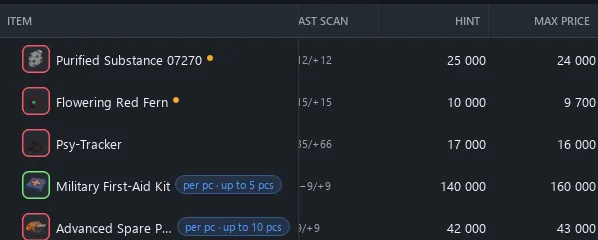
Each item in the table has its own lowest price, wall, median, number of lots under the wall and, for an item sold in stacks, price per piece. If lots of different rarity, upgrade or name colour lie under one name, each group has its own row. In the same row the max price hint stands next to your max price.
The max price hint
A double click on a row opens the item card. At the top are the four numbers from the order book section, and the max price hint is under them. It counts the same way as in the example above: the fee of 5% is taken off the wall, the result is divided by 1.10 (a margin of 10%) and rounded down: 42,318 → 42,000. The “≈” sign at a hint means there is no wall and the hint goes by the median. The max price doesn't change by itself: only by the “Set max price” button in the card or “Set max price by the hint” in the table.

Scan history
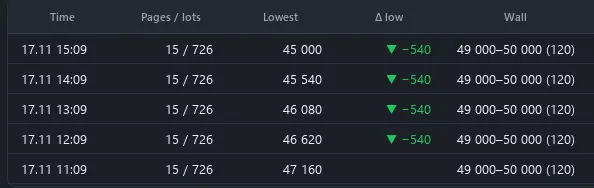
A scan can run by the clock, from once in 15 minutes: the history builds up by itself. The card shows it as a chart and a table: how the lowest price and the wall changed and where your max price was. It shows how the time of day, an emission or an event acts on the price of your item. In the example the wall stands at 49,000 over five scans, and the lowest price slides from 47,160 to 45,000.
A max price per piece
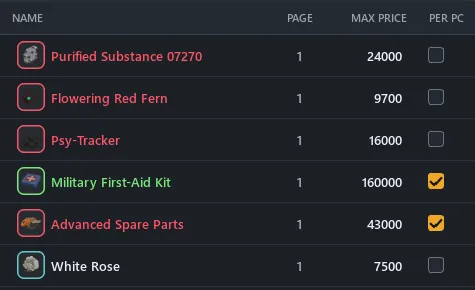
The max price itself is set in Items. The “Per pc” tick makes it a max price for one piece, for lots of any size: that is how the bot bought the lot of two pieces in case 4. In the example the item's max price is 43,000, 2% above the hint, and the card says so.
The program sees only the lots on sale: it doesn't know what was bought and for how much. So its hint is about the order book, not about deals, and the deals history is still worth checking in trackers.
Once a max price is set, AuctionSniper searches for the items in the game by itself and buys lots at or below the max price, if another player wasn't faster. The program has been tested on the RU server; on EU and other servers you can check it on your own PC before buying, with no key: how to check, Download. The game's rules may prohibit third-party programs and automation: read them before you buy (FAQ).
Additional sources
Also used in preparing the article:
- “A guide to money: trading and the STALZONE market”, Bazich, YouTube, August 2026, in Russian: kinds of trading on the market, liquidity, why lots are not deals.
- “The full guide to trading in STALCRAFT X”, Lonely | SZ, YouTube, June 2026, in Russian: deals history, counting the price to buy at, retail and wholesale.
- “I Tried Beating STALZONE’s Auction House”, Gigabeef, YouTube, August 2026: flipping artifacts, sales per day, the market after an emission.